Updated October 14, 2026. Written for LightCraft 0.7.1 (what changed since). Prices in USD.
What Lightroom offers on a Chromebook
| Option | Cost | On a Chromebook |
|---|---|---|
| Lightroom app for Android | Free download, in-app purchases | Only on Chromebooks with Google Play; school and work admins can block it |
| Lightroom on the web | Lightroom plan, $11.99/month (annual) | Adobe lists Windows 11 and macOS 14 as supported systems, not ChromeOS |
| Lightroom Classic | Part of the Photography plan, $19.99/month (annual) | Windows and macOS only |
| LightCraft in Chrome | Free | Runs in a Chrome tab; files stay on the Chromebook |
The Android app, listed on Google Play as Lightroom Photo & Video Editor, is the closest thing to an official route. Google Play is available on only some Chromebooks, and on a school or work account the administrator decides whether you can install Android apps at all.
Lightroom on the web runs in a browser, but it comes with a Lightroom plan at $11.99 a month on an annual commitment, with 1 TB of cloud storage. Adobe's technical requirements name Windows 11 and macOS 14 or later, Chrome 139 or later, 8 GB of RAM and a four-core processor. ChromeOS is not on that list. Lightroom Classic, the desktop app, has no ChromeOS version.
Develop RAW photos in Chrome
- Open lightcraft.run/editor in Chrome. The first visit downloads about 20 MB and opens a library with demo photos.
- Open the Files app next to it and drag your photos onto the LightCraft window, straight from Downloads or from your camera's SD card. File › Import Photos… (Ctrl+Shift+I) works too, but its file list leaves out CR3, RAF, RW2, ORF and PEF files, so drag those.
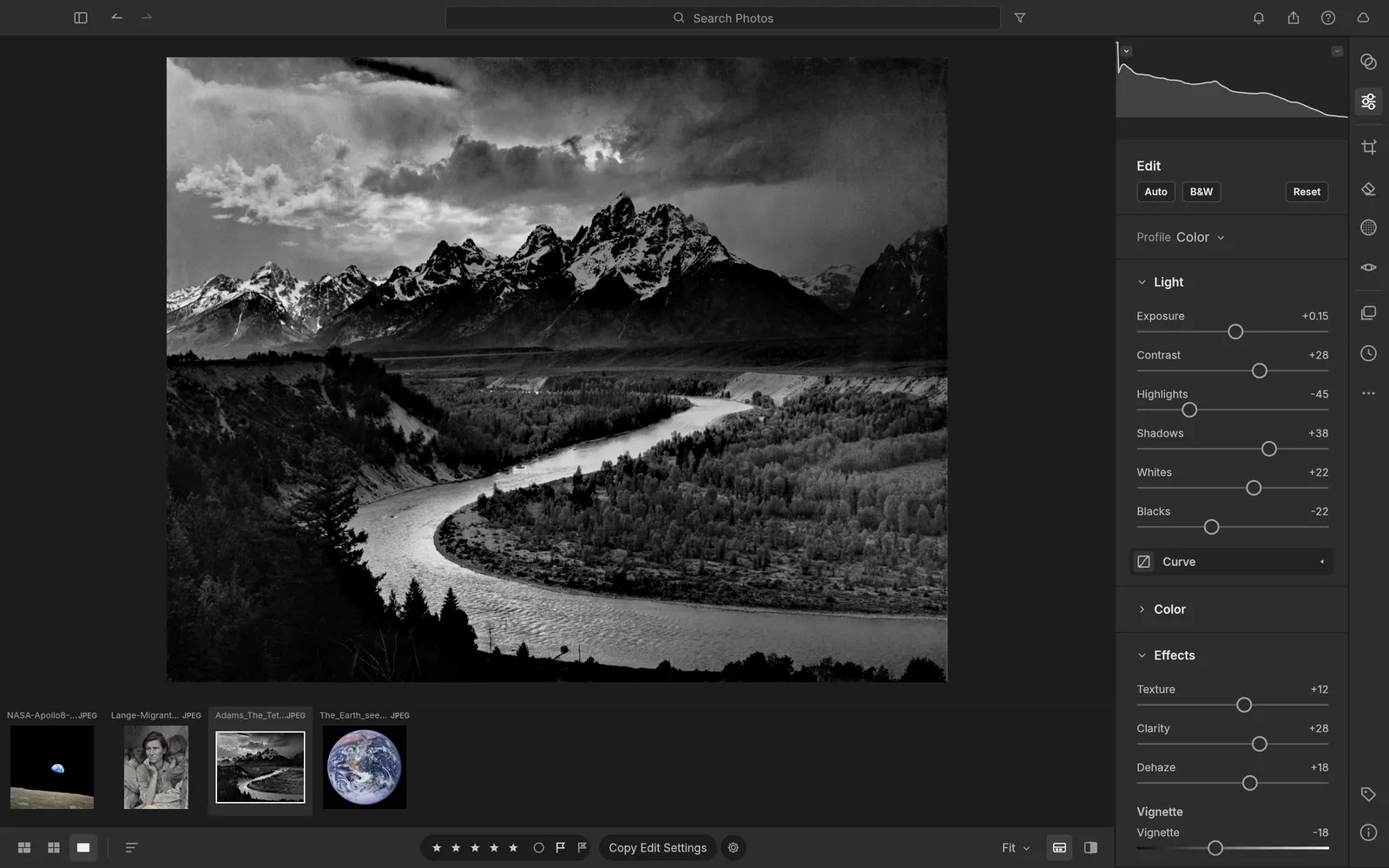
- LightCraft copies each file into the library and shows it in the grid. Select one and press E to edit: Light, Color, Effects, Detail, then crop with C and masks with M. Shortcuts that say ⌘ on a Mac use Ctrl here.
- Hold \ to see the original, or press Y for before and after side by side.
- Press Shift+E to export. Pick JPEG and a size; the file lands in your Downloads folder.
Which raw files decode depends on the camera, not on the Chromebook; the RAW editing guide has the full table, and Canon owners should read opening CR3 files. HEIC photos from an iPhone don't open in the browser build: set the iPhone's camera format to Most Compatible or send yourself JPEGs.
How much fits on a Chromebook
Storage is the real constraint. Importing copies every photo into Chrome's storage for this site, and Chrome lets one site use up to 60% of the disk, as long as the space is actually free. On a 64 GB Chromebook that is a ceiling of about 38 GB, and in practice less.
Three details change how you work. LightCraft asks Chrome to keep its storage permanently; if Chrome says no, a notice warns that the library could be cleared when the disk runs low. Removing photos from the library doesn't free their space yet, because the stored originals stay until you clear the site's data, which deletes the whole library. And File › Back Up Library… writes a zip of at most 4 GB, so a library much bigger than that can't be backed up in one piece.
The pattern that suits a Chromebook is one shoot at a time: import it, develop, export the JPEGs, back up the library, and keep the original raws on the SD card or an external drive.
How fast it is
LightCraft renders on the processor, not the graphics chip, in up to four background workers, so a slider drag shows a quick draft and the full-quality picture follows when you let go. The processor sets the pace: an entry-level Chromebook takes longer over that final render and over exports than a fast one. Intel and ARM Chromebooks run the same WebAssembly build, so both work.
LightCraft is laid out for a mouse, a keyboard and a large screen. On a narrow window, under 760 pixels wide, the editor says so before you start; folded into tablet mode it still runs, but panels and sliders are cramped. If the sliders are new to you, the AI panel can suggest settings for a photo, on your own API key or Craft Apps credits.
Desktop apps through Linux
Many Chromebooks can run Linux apps in a Debian environment that you turn on under Settings › About ChromeOS › Developers. That opens a second route: LightCraft's desktop downloads include Debian packages and AppImages for Intel and ARM, and darktable offers AppImages and packages too. Neither project lists ChromeOS as a supported system, and the Linux environment takes its own share of disk. It is worth trying if you want a library in a normal folder rather than in the browser; darktable vs LightCraft compares the two.
On a school or work laptop
The same browser route works on any computer where you can't install software, Windows and Mac included: there is no installer, no account and no upload, only a browser tab. The developers test in Chrome; Safari and Firefox testing is still in progress. Two cautions on a shared machine. A private or guest window deletes the library when it closes, so export before you leave. And in a normal window your photos stay in that browser profile until the site's data is cleared, so back up the library and clear lightcraft.run's site data when you are done. The Craft apps hub explains the trade-offs of browser versus desktop in more detail.
Before your first real session, check free space in the Files app, update Chrome, and import a single shoot. Export one JPEG and run File › Back Up Library… once, so you know where both files end up.